
解决问题
在Blender的Edit模式下,没有针对顶点色的便捷选中/修改功能。
使用方法
- 进入Edit模式
- 选中顶点
- 使用Get获取选择的顶点的顶点色/手动设置一个顶点色
- 点击Apply将顶点色运用到选中的所有顶点上
auto pick color 功能可以自动获取当前选中顶点的顶点色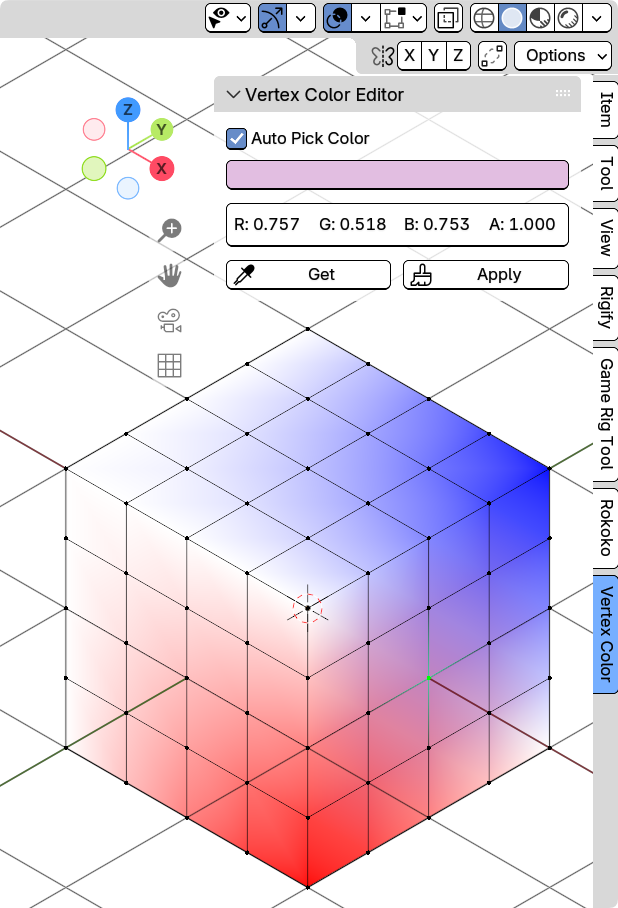
鼠标右键也可以吸色/填色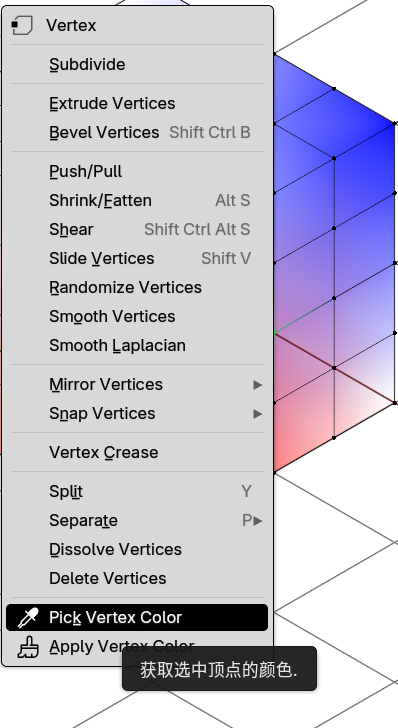
下载
你也可以直接复制下面的代码,放到VertexColorEditor.py中,然后使用blender的插件管理器进行导入
import bpy
import bmesh
from bpy.props import FloatVectorProperty, BoolProperty
from bpy.types import Panel, Operator, Menu

bl_info = {
    "name": "Vertex Color Editor",
    "blender": (4, 2, 4),
    "category": "Mesh",
    "version": (1, 0, 0),
    "author": "Kani",
    "description": "Edit vertex colors with alpha in Edit mode",
}

class MESH_OT_apply_vertex_color(Operator):
    """应用顶点颜色到选中的顶点"""
    bl_idname = "mesh.apply_vertex_color"
    bl_label = "Apply Color to Selected Vertices"
    bl_options = {'REGISTER', 'UNDO'}

    @classmethod
    def poll(cls, context):
        return (context.mode == 'EDIT_MESH' and
                context.active_object and
                context.active_object.type == 'MESH')

    def execute(self, context):
        obj = context.active_object
        props = context.scene.vertex_color_props

        # 获取bmesh
        bm = bmesh.from_edit_mesh(obj.data)
        bm.faces.ensure_lookup_table()
        bm.verts.ensure_lookup_table()

        # 确保有顶点颜色层
        if not bm.loops.layers.color:
            bm.loops.layers.color.new("Col")

        color_layer = bm.loops.layers.color.active

        # 获取选中的顶点
        selected_verts = [v for v in bm.verts if v.select]

        if not selected_verts:
            self.report({'WARNING'}, "没有选中的顶点")
            return {'CANCELLED'}

        # 应用颜色到选中顶点的所有loop,包括alpha
        color_to_apply = props.vertex_color

        for face in bm.faces:
            for loop in face.loops:
                if loop.vert.select:
                    loop[color_layer] = color_to_apply

        # 更新网格
        bmesh.update_edit_mesh(obj.data)

        self.report({'INFO'}, f"已应用颜色到 {len(selected_verts)} 个顶点")
        return {'FINISHED'}

class MESH_OT_get_vertex_color(Operator):
    """获取选中顶点的颜色"""
    bl_idname = "mesh.get_vertex_color"
    bl_label = "Get Color from Selected Vertex"
    bl_options = {'REGISTER'}

    @classmethod
    def poll(cls, context):
        return (context.mode == 'EDIT_MESH' and
                context.active_object and
                context.active_object.type == 'MESH')

    def execute(self, context):
        obj = context.active_object
        props = context.scene.vertex_color_props

        # 获取bmesh
        bm = bmesh.from_edit_mesh(obj.data)
        bm.faces.ensure_lookup_table()
        bm.verts.ensure_lookup_table()

        # 检查是否有顶点颜色层
        if not bm.loops.layers.color:
            self.report({'WARNING'}, "网格没有顶点颜色层")
            return {'CANCELLED'}

        color_layer = bm.loops.layers.color.active

        # 获取第一个选中顶点的颜色
        for face in bm.faces:
            for loop in face.loops:
                if loop.vert.select:
                    color = loop[color_layer]
                    props.vertex_color = (color[0], color[1], color[2], color[3])
                    self.report({'INFO'}, f"已获取顶点颜色: RGBA({color[0]:.3f}, {color[1]:.3f}, {color[2]:.3f}, {color[3]:.3f})")
                    return {'FINISHED'}

        self.report({'WARNING'}, "没有选中的顶点")
        return {'CANCELLED'}

class VertexColorProperties(bpy.types.PropertyGroup):
    """顶点颜色属性"""
    vertex_color: FloatVectorProperty(
        name="Vertex Color",
        description="顶点颜色(包含Alpha)",
        subtype='COLOR',
        default=(1.0, 1.0, 1.0, 1.0),
        min=0.0,
        max=1.0,
        size=4
    )

    auto_pick_color: BoolProperty(
        name="Auto Pick Color",
        description="自动拾取选中顶点的颜色",
        default=False
    )

class VIEW3D_PT_vertex_color_panel(Panel):
    """顶点颜色编辑面板"""
    bl_label = "Vertex Color Editor"
    bl_idname = "VIEW3D_PT_vertex_color"
    bl_space_type = 'VIEW_3D'
    bl_region_type = 'UI'
    bl_category = "Vertex Color"

    @classmethod
    def poll(cls, context):
        return (context.mode == 'EDIT_MESH' and
                context.active_object and
                context.active_object.type == 'MESH')

    def draw(self, context):
        layout = self.layout
        props = context.scene.vertex_color_props

        # 自动拾取开关
        layout.prop(props, "auto_pick_color", text="Auto Pick Color")

        # 颜色属性(包含alpha)
        col = layout.column()

        # 使用分离的行来更好地控制布局
        row = col.row()
        row.prop(props, "vertex_color", text="")

        # 显示RGBA值
        color = props.vertex_color
        col.separator()

        # 显示具体的RGBA数值
        box = col.box()
        grid = box.grid_flow(columns=4, align=True)
        grid.label(text=f"R: {color[0]:.3f}")
        grid.label(text=f"G: {color[1]:.3f}")
        grid.label(text=f"B: {color[2]:.3f}")
        grid.label(text=f"A: {color[3]:.3f}")

        # 按钮
        col.separator()
        # 添加图标到按钮
        row = col.row()

        row.operator("mesh.get_vertex_color", text="Get", icon='EYEDROPPER')
        row.operator("mesh.apply_vertex_color", text="Apply", icon='BRUSH_DATA')
        #row = col.row()

def draw_vertex_color_menu(self, context):
    """在编辑模式右键菜单中添加顶点颜色选项"""
    if context.mode == 'EDIT_MESH':
        layout = self.layout
        layout.separator()
        layout.operator("mesh.get_vertex_color", text="Pick Vertex Color", icon='EYEDROPPER')
        layout.operator("mesh.apply_vertex_color", text="Apply Vertex Color", icon='BRUSH_DATA')

# 自动更新处理器
def selection_update_handler(scene, depsgraph):
    """当选择改变时自动获取顶点颜色"""
    context = bpy.context
    props = scene.vertex_color_props

    # 检查是否启用了自动拾取
    if not props.auto_pick_color:
        return

    if (context.mode != 'EDIT_MESH' or
        not context.active_object or
        context.active_object.type != 'MESH'):
        return

    obj = context.active_object

    try:
        # 获取bmesh
        bm = bmesh.from_edit_mesh(obj.data)

        # 检查是否有顶点颜色层
        if not bm.loops.layers.color:
            return

        color_layer = bm.loops.layers.color.active

        # 获取第一个选中顶点的颜色
        for face in bm.faces:
            for loop in face.loops:
                if loop.vert.select:
                    color = loop[color_layer]
                    # 避免递归更新
                    if (abs(props.vertex_color[0] - color[0]) > 0.001 or
                        abs(props.vertex_color[1] - color[1]) > 0.001 or
                        abs(props.vertex_color[2] - color[2]) > 0.001 or
                        abs(props.vertex_color[3] - color[3]) > 0.001):
                        props.vertex_color = (color[0], color[1], color[2], color[3])
                    return
    except:
        pass

classes = (
    VertexColorProperties,
    MESH_OT_apply_vertex_color,
    MESH_OT_get_vertex_color,
    VIEW3D_PT_vertex_color_panel,
)

def register():
    for cls in classes:
        bpy.utils.register_class(cls)

    bpy.types.Scene.vertex_color_props = bpy.props.PointerProperty(type=VertexColorProperties)

    # 添加右键菜单
    bpy.types.VIEW3D_MT_edit_mesh_context_menu.append(draw_vertex_color_menu)

    # 添加选择更新处理器
    if selection_update_handler not in bpy.app.handlers.depsgraph_update_post:
        bpy.app.handlers.depsgraph_update_post.append(selection_update_handler)

def unregister():
    # 移除选择更新处理器
    if selection_update_handler in bpy.app.handlers.depsgraph_update_post:
        bpy.app.handlers.depsgraph_update_post.remove(selection_update_handler)

    # 移除右键菜单
    bpy.types.VIEW3D_MT_edit_mesh_context_menu.remove(draw_vertex_color_menu)

    del bpy.types.Scene.vertex_color_props

    for cls in reversed(classes):
        bpy.utils.unregister_class(cls)

if __name__ == "__main__":
    register()